
Step 01
Find the Official App
Search for “rednote,” “Xiaohongshu,” or “小红书” in the Apple App Store or Google Play. Check the developer name and app listing before installing; availability may vary by country. Avoid unfamiliar APK download sites.

Use Xiaohongshu (小红书), also known as RedNote or Little Red Book, to discover local food, neighborhood walks, and lesser-known places across China. Learn how to search in Chinese, understand travel posts, check recommendations, and turn saved finds into a practical itinerary.
Platform Overview
Think of Xiaohongshu as a place to discover travel ideas through people's posts—not as a live source of ticket availability, verified opening hours, or turn-by-turn navigation.
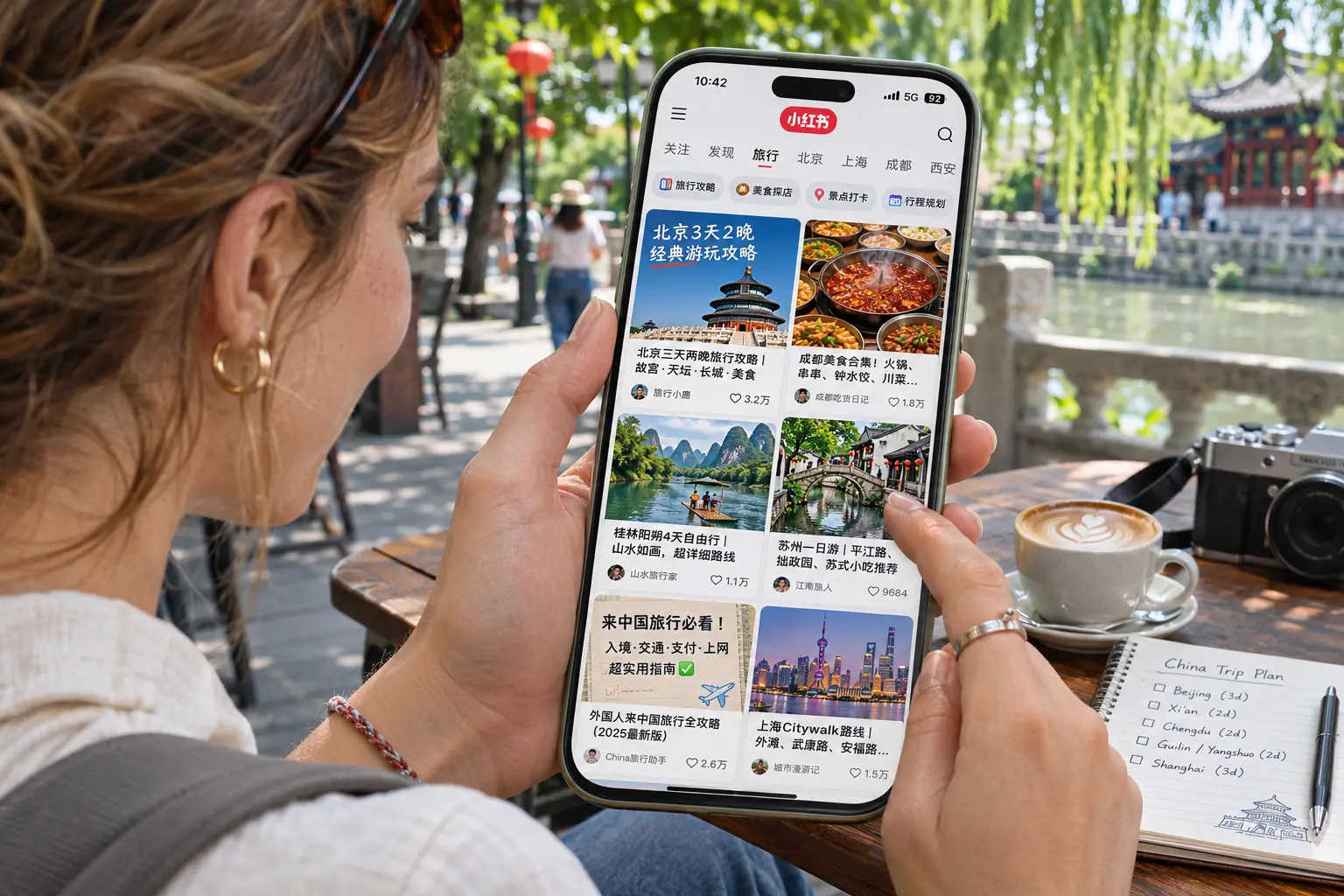
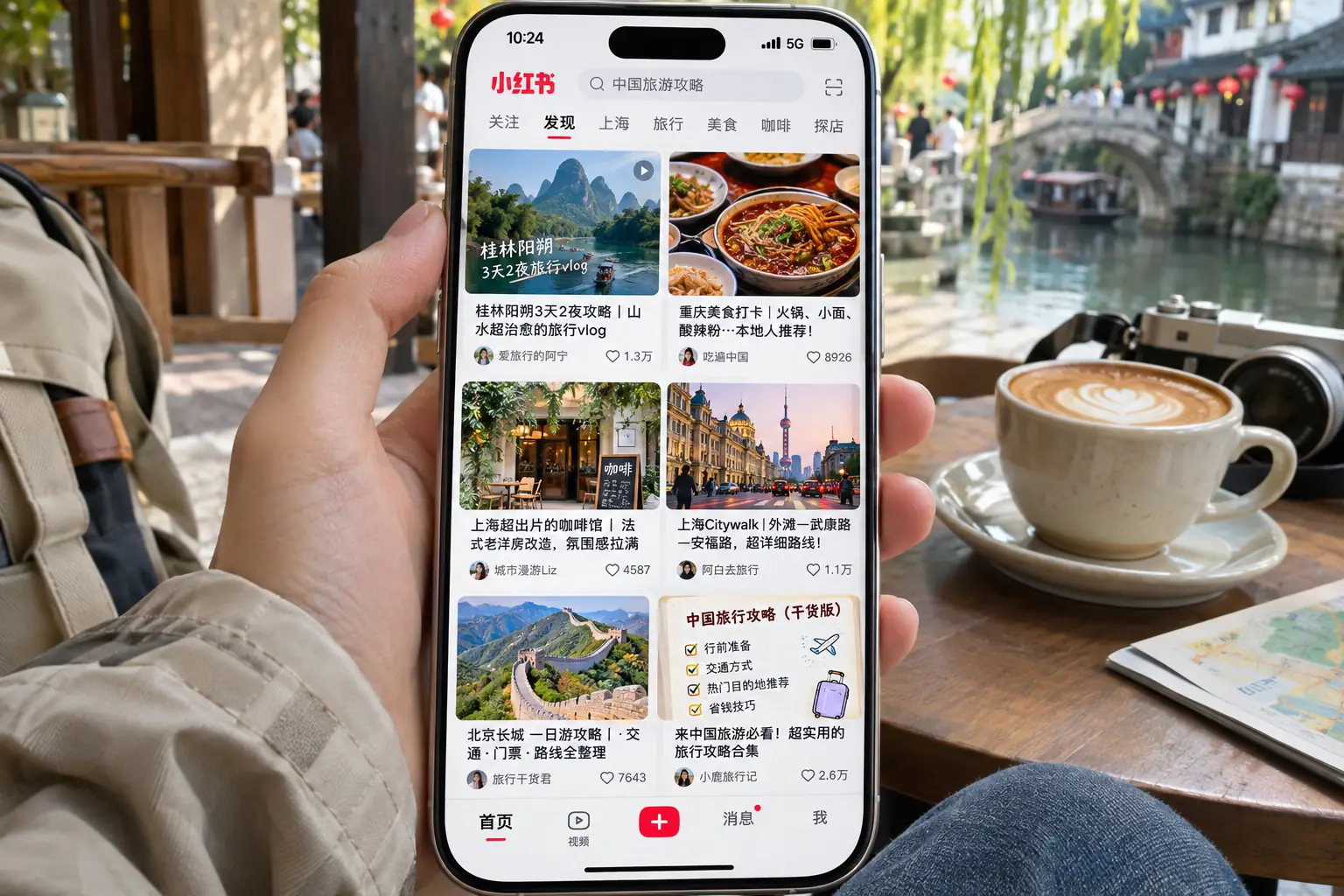
Xiaohongshu (小红书), also known as RedNote or Little Red Book, is a social platform where people share photos, short videos, and everyday recommendations. For travelers visiting China, those posts can offer a closer look at local restaurants, neighborhood walks, cafés, and photo spots than a standard attraction list.
A travel post might show a particular dish, a quiet street, or the angle from which someone took a photo. But posts reflect individual experiences, and the feed is personalized. Popularity alone does not tell you whether a place is suitable, still open, or easy to reach on your trip.
Getting Started
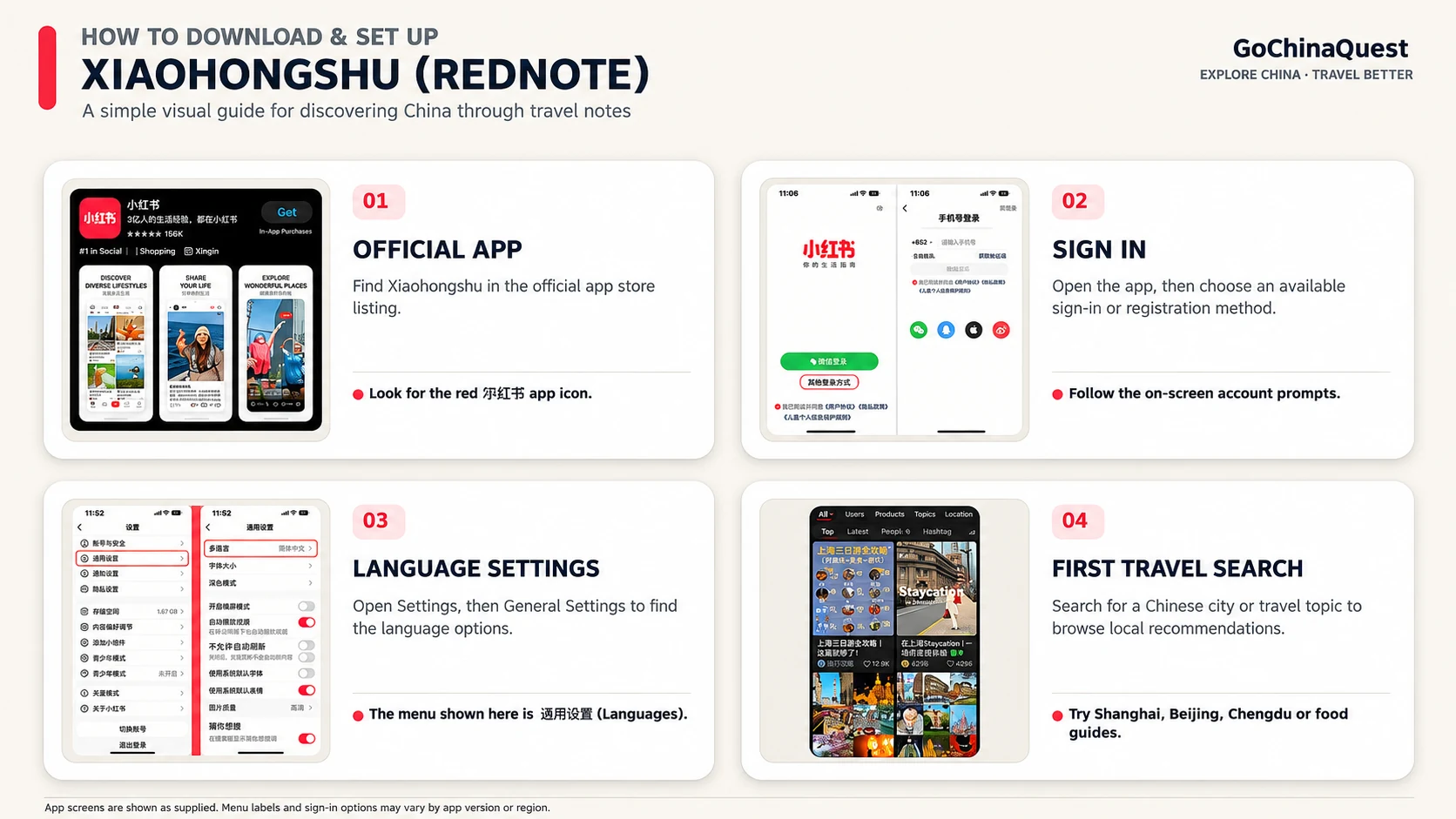
You can start exploring travel posts before your trip to China. Install the correct app, choose an available sign-in method, and learn where to find language settings. Screens can differ by device, region, and app version.
Step 01
Search for “rednote,” “Xiaohongshu,” or “小红书” in the Apple App Store or Google Play. Check the developer name and app listing before installing; availability may vary by country. Avoid unfamiliar APK download sites.
Step 02
Follow the options shown on your screen. For phone sign-up, select your country code and enter a number that can receive an SMS code. Other sign-in methods may appear depending on your device and version.
Step 03
Open Me (我) and find Settings (设置), usually through the profile menu. Look for General or Language settings and choose English if offered. Translating menus does not automatically translate every post or image.
Step 04
Try a city plus a travel interest—for example, “上海 咖啡馆” (Shanghai cafés). Explore photo posts, dates, and comments. If the app asks for interests, choose topics such as travel or food.
Before You Start Searching
The interface may change after updates. These checks help you get started without assuming every traveler sees the same login screen or translation controls.
Search Like a Local
You do not need to speak Mandarin to search RedNote. Copy a short Chinese phrase into the search bar: start with a city or neighborhood, add what you want to find, then narrow the results with a practical detail. These examples are search queries—not endorsements of particular places.
Search by neighborhood, dish, or preference instead of relying on a generic “best restaurants” list.
Look for a specific landmark plus a photo-viewpoint or quieter-place term to find more precise posts.
Use route, weather, or travel-party keywords to narrow down generic destination inspiration.
Try place + interest + detail. For example, 成都 火锅 本地人推荐 combines a city, a dish, and a local-recommendation modifier. If results are too broad, replace the city with a district or an exact attraction name.
Use a Chinese city, district, or landmark name; copy it from a map listing if needed.
攻略 = guide; 路线 = route; 机位 = photo viewpoint; 探店 = shop or restaurant visit.
Try 排队 (queues), 价格 (prices), or 避坑 (pitfall warnings) for a fuller picture.
Check post dates, photo captions, and recent comments. Popular posts do not prove a place is still open.
Read Beyond the Photos
Most of the travel advice on Xiaohongshu (RedNote) is written by users, often in Chinese. You can usually understand the main idea with translation tools, but the useful details are often in captions, photo text, and comments—not just the headline.
Step 01 · Post Text
Open a travel note and look for a Translate option near the caption or in its menu. Depending on your app version and region, translations may appear automatically or require a tap. An English app interface does not guarantee that every post is translated. Keep the original Chinese place name handy.
Step 02 · Image Text
Prices, menus, opening hours, and directions may appear inside photos instead of the caption. If the app cannot translate that text, use your phone’s image-text translation tool on a screenshot. Treat translated figures and place names as clues to verify—not confirmed booking details.
Step 03 · Comments
Read several recent comments for context about queues (排队), prices (价格), or pitfalls (避坑). A single enthusiastic or negative comment is not proof. Check the date and whether the commenter describes a first-hand visit rather than repeating a rumor.
Before You Save a Place
Xiaohongshu notes can be excellent starting points for travel planning, but they are personal posts—not official attraction notices or guaranteed restaurant reviews. Use this checklist to turn a translated post into a better-informed travel lead.
Local Discovery in Practice
These example searches show how to turn Xiaohongshu (RedNote) travel ideas into a usable plan. Try the Chinese phrase, compare recent posts, then check each place independently. They are illustrative workflows—not live search results, firsthand visits, or endorsed businesses.
Search 上海 愚园路 citywalk 路线. Compare the stops listed in several walking posts and keep their Chinese names. Check the distances and street layout in a navigation app instead of assuming that the photo order is a sensible walking route. Note any shop opening hours before adding detours.
Search 上海 静安 雨天 咖啡馆. Look for indoor seating, a clearly identified branch, and recent visitor photos. A post may highlight the atmosphere without giving the exact address. Match the Chinese business name and location to a current map listing before you travel there.
Search 故宫 游览路线 入口. Compare route ideas with your available time and look for references to entrances, exits, and walking distances. Treat reservation and entry advice in user posts as unverified: confirm current ticket rules and visitor notices with the Palace Museum’s official information before making plans.
Search 北京 什刹海 胡同 步行路线. Scan route photos and the comments for practical details such as access points, crowded stretches, and suggested times of day. Transfer the Chinese landmark names into a map app; do not treat a creator’s scenic photos as evidence that every alley or viewpoint is publicly accessible.
Search 成都 玉林 美食 本地人推荐. Note specific dish names and addresses rather than picking the post with the most likes. Check several recent reviews, branch details, and any mentions of queues or price changes. Shortlist places that fit your route, then verify them separately.
Search 成都 人民公园 茶馆 攻略. Use posts to understand the type of teahouse experience you want and what visitors describe paying for. Do not assume an old menu, price, or seating tip is current. Check the exact venue, availability, and on-site arrangements before relying on a note.
From Discovery to Directions
Finding a place on Xiaohongshu (RedNote) is the start of a travel plan—not proof of its address or availability. Use these six checks to turn saved posts into confirmed locations you can actually reach in China.
A note shows attractive photos, but its location tag is missing, vague, or points to a neighborhood rather than a business.
Save the post, then identify the place. Open the note and use its bookmark or Favorites control (收藏); the icon and position may differ by version. Reopen saved notes through your profile (我) under Favorites or 收藏. Look in the caption, photo text, location tag, and comments for the original Chinese business name and address. If the location cannot be identified, treat the note as inspiration rather than a map-ready stop.
A café or restaurant appears in several districts, or the post refers to an older or different branch.
Match the exact branch before saving a map pin. Paste the Chinese name into Amap (高德地图) and compare the district, street address, storefront photos, and nearby landmarks. Use Dianping (大众点评) as an additional check for the exact business and branch. Listings can be outdated, so compare details rather than trusting one source.
A scenic photo spot, market, or large attraction may have several gates, levels, or access points. A general map pin can still leave you far from the usable entrance.
Check the arrival point, not only the destination name. Compare the post's directions with Amap walking or transit routes; Shanghai's official Amap guide explains the routing tools. Look for an entrance name, nearby metro exit, and signs that an area is open to visitors. Never assume a photo viewpoint is publicly accessible.
A widely saved post may predate a closure, relocation, seasonal schedule, or change in reservation rules.
Recheck time-sensitive details close to your visit. Compare the post date and recent comments with a current map or business listing. For museums, scenic attractions, and managed sites, prioritize their official notices for opening times, closures, and visitor access.
A post may mention entry tickets, a restaurant queue number, a package, or a reservation without explaining the actual booking conditions.
Keep discovery separate from purchase and confirmation. Use RedNote to shortlist options, then check the attraction's official booking channel or the provider's current listing for date, price, passport requirements, and cancellation terms. A saved note is not a ticket or reservation.
You find several good places but cannot quickly retrieve the correct Chinese address when mobile data is weak or you need to show a taxi driver where to go.
Organize your saved notes and keep an offline fallback. If your app version offers collections or folders, group Favorites by city; otherwise keep a separate list. Record each place’s Chinese name, city or district, confirmed address, Amap listing, and why you saved it. Save essential details to a screenshot or offline note—saving a RedNote post alone does not guarantee offline access.
Read Beyond the Hype
A viral RedNote post is a lead, not a verified travel recommendation. Open these eight checks to separate useful local tips from advertising, edited imagery, and missing context before you build your China itinerary.
A restaurant, hotel, or experience may be promoted through a formal advertisement, a creator partnership, or an incentive such as a free visit. Look for labels such as 广告 (ad) and 合作 (collaboration), but do not assume an unlabeled post is independent. Compare the claims with unrelated accounts before deciding.
Wide-angle framing, colour grading, cropping, and carefully chosen shooting times can make a crowded location seem empty or a seasonal view seem permanent. Look for ordinary visitor photos, video footage, and captions explaining when the images were taken. A beautiful photo is inspiration, not a guarantee of what you will see.
The phrase “hidden gem” often describes a photogenic or newly popular spot rather than one that is little visited. Search the same place with 人多 (crowded), 排队 (queue), or 周末 (weekend). Decide whether the experience still suits you if it is busy.
High engagement can indicate that a post is entertaining or visually appealing; it does not confirm accurate prices, a good service experience, or the quality of a recommendation. Read detailed accounts that mention both advantages and drawbacks, and treat follower counts and popularity as weak evidence on their own.
A spring flower route, autumn colour viewpoint, or rainy-season trail can look very different outside the conditions shown. Check the original posting date and the season in the photos. Search for recent experiences from the same month you plan to travel, especially where weather or seasonal timing is essential.
A short video may skip admission fees, minimum purchases, long waits, access restrictions, or the time needed to reach a viewpoint. Look in the caption and comments for practical details rather than relying on a headline such as “must visit” or “worth the trip”. If key conditions are unclear, leave the activity optional until you can confirm them.
One enthusiastic account or several near-identical captions may not represent a broad range of visitor experiences. Search the place name with 避坑 (avoid pitfalls) or 避雷 (warning), then compare specific complaints with positive posts. Negative posts can also be exaggerated, so look for repeatable details rather than taking either side at face value.
Be cautious if a travel post asks you to transfer money, send passport information, or buy entry through an unverified private message. Treat payment instructions in user-generated content as unconfirmed. Find the attraction’s official ticket channel or a reputable booking provider separately, and check the current terms before paying.
From Inspiration to a Real Trip
Xiaohongshu is useful for discovering local food, walks, and photo spots—but saved posts are not a day plan. Turn your RedNote ideas into a route by checking locations, travel times, opening rules, and reservations separately.
Step 01
Choose a few saved posts for each city. Keep the Chinese place name, a screenshot or note, and why it interests you. Separate essentials from optional stops instead of treating every viral post as a must-see.
Step 02
Find each exact place in AMap Global for iOS or Android (Gaode Maps), then compare available walking and public-transport options. For a step-by-step overview, read the Shanghai government’s guide to using AMap in English. Group nearby stops to reduce backtracking, and check the entrance or specific branch before deciding your route.
Step 03
Leave room for travel, meals, queues, and rest. Build a flexible morning or afternoon block rather than packing in every recommendation. Keep a rainy-day or closed-venue alternative.
Step 04
Check current entry rules, opening hours, and availability through the attraction’s official channel or a reputable booking service. A Xiaohongshu post does not confirm a ticket, hotel room, or train seat.

Illustrative Shanghai Example
Suppose you want an easy afternoon around Yuyuan Road in Shanghai. Use this simple research worksheet before putting any stops on your itinerary. The example is illustrative, not a verified route or live venue recommendation.

Frequently Asked Questions
Answers to practical questions from first-time visitors—whether you need a Chinese phone number, what works in English, and how to use RedNote alongside other China travel apps.
Yes. Xiaohongshu is a Chinese social discovery app used in mainland China, and visitors can use it to research food, attractions, and neighborhoods. You do not need to be a Chinese citizen to explore travel posts. However, access to some account features or purchases may depend on verification, region, and the current app version.
Not necessarily. International mobile numbers are supported in many registration flows. Select your country code and use a number that can receive verification messages. SMS delivery and available sign-in options can vary by region and account, so check the choices shown in your app rather than assuming every overseas number will work.
An English interface is available in some app versions and settings, but much of the travel content is written in Chinese. Interface language and post translation are separate features. If a caption, comment, or setting does not translate, use a trusted translation tool and verify important details such as opening times and prices independently.
Yes. Start with a city or neighborhood name plus a short Chinese search phrase, such as 上海 咖啡馆 (Shanghai cafés). Use available post translation for captions and comments and an image-text translator for signs or menus embedded in photos. Treat translations as a guide, especially for slang, place names, and reservation instructions.
Generally, no. RedNote is a mainland Chinese platform and normally works on local Chinese networks without a VPN. This is different from access to some international websites or services. Network access and account verification can still vary, so download the app and test your sign-in before departure.
Do not assume a travel post is a booking channel. Xiaohongshu is most useful for discovering and researching places; commercial features and merchants may appear, but payment methods and availability vary. For tickets, hotels, or tours, verify the final price, date, entry conditions, and cancellation policy through an official channel or a reputable booking service.
Treat each post as one visitor’s account, not proof that a place will suit your trip. Compare recent posts from different creators, read specific comments, check the season and possible sponsorship, and confirm practical details separately. Popularity, likes, and attractive photos alone do not establish accuracy.
Use Xiaohongshu for ideas, then choose a tool for the next task. Amap (Gaode Maps) can help check Chinese place names and routes; Dianping may offer additional local business reviews. For payments, messaging, transport, and advance bookings, prepare the services relevant to your own itinerary rather than expecting RedNote to replace them.
Continue Exploring
Explore the cities you found on Xiaohongshu, then turn saved discoveries into practical plans for connectivity, rail travel, and your first trip to China.

Turn Xiaohongshu discoveries into a Shanghai itinerary with neighborhood walks, local food, and practical sightseeing ideas.
Read the Guide →
Plan visits to the Forbidden City, hutong neighborhoods, and other Beijing highlights after exploring local RedNote tips.
Read the Guide →
Go beyond saved food posts to plan Chengdu sightseeing, local neighborhoods, and a realistic city itinerary.
Read the Guide →
Compare ways to stay connected while using Xiaohongshu, map apps, and mobile travel tools in China.
Read the Guide →
Learn how foreign travelers can prepare for rail journeys when linking saved destinations into a multi-city trip.
Read the Guide →
Bring your saved inspiration together with practical decisions about destinations, travel timing, and trip preparation.
Read the Guide →Plan My China Trip